




Li’l Billy is finishing a Bible assignment. He reviews the answer assignment, navigates through a few pages to make sure all of the answers are correct, then hits “Submit”. Suddenly, from the living room, “Moooom!” Some of the answers were changed after the assignment was submitted.
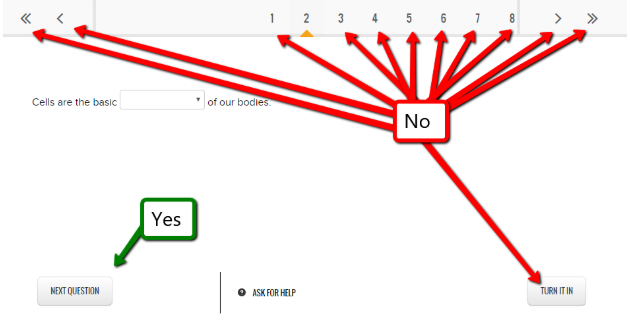
The good news is that it is a simple solution. If Li’l Billy clicks the “next question” button to move through the pages, when he clicks “Submit” they all go through as is. However, if he uses the browser’s forward and backward arrows to move through the pages, there is a chance the answers will not be saved.
The bad news is that your student will need to redo the assignment. Your student can send a direct message to their teacher explaining the situation and requesting for the assignment to be reassigned.
TWIST: If you answered all questions and decided to go back and change an answer before hitting “Submit”, you need to:
- Change the answer.
- Click “Next Question” to save the answer you just changed. Clicking any other button will not save the new answer.
- After clicking “Next Question”, you can move to the end and submit the assignment.
Since 2003, Enlightium Academy has supported K–12 students in online, book-based, hybrid, and partner schools. Our dedicated faculty and staff, in collaboration with parents, deliver high-quality instruction and individualized learning. We focus on developing each student’s academic, spiritual, physical, social, and emotional well-being.
To find out if Enlightium is the right school for your family, schedule an appointment, call (509) 319-2288, or visit EnlightiumSchool.com.

